
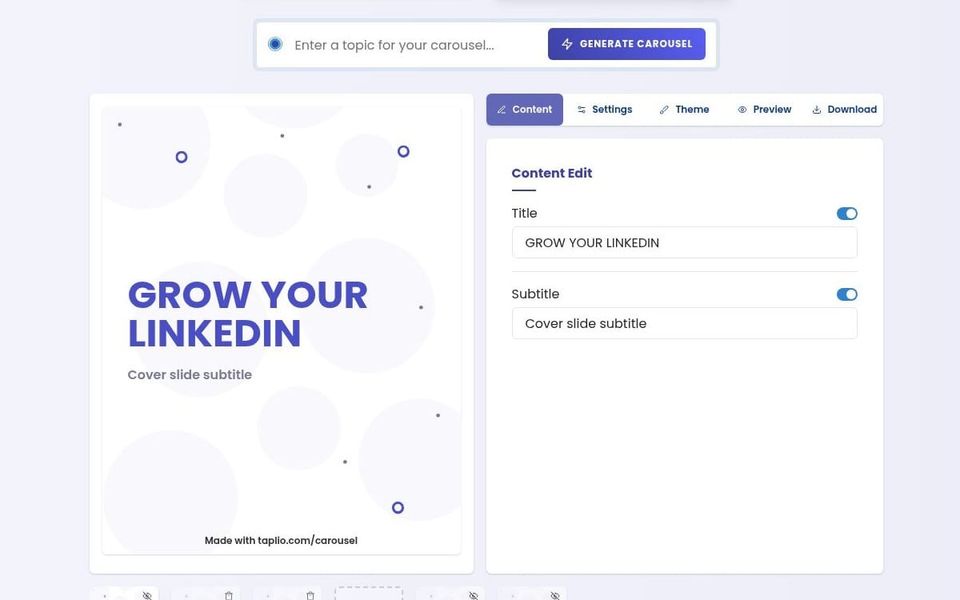
If you have an idea that would be easier to follow as a sequence of short slides than as one long LinkedIn post, Taplio’s LinkedIn Carousel Generator may be useful to try. It provides an editor for arranging content, changing the theme, previewing the slides and downloading the result as a PDF for upload to LinkedIn.
Recommended by
What it can help with
The generator may help you turn an existing thread, Reddit post or group of images into a carousel, or begin with a topic and use AI to suggest a draft structure. You can edit the title, subtitle and individual slides, add personal details and choose a visual theme before exporting.
Inspiration Space note: A carousel earns its place when the sequence helps the reader understand something: one idea per slide, a clear progression and enough space to read without effort. Changing the format is not the same as improving the thinking, so the most valuable work still happens when you decide what to leave out and what order the reader needs.
Who it may suit
It may suit founders, consultants, educators and marketers who occasionally want to test the carousel format without paying for a separate design tool. It may be less suitable if you need close control over brand typography, detailed layouts, collaborative approvals, accessibility or reusable templates across several channels.
How it works
Choose whether to import posts or images, create slides from scratch or generate a starting draft with AI. Edit the content and theme, preview the sequence, then download the carousel as a PDF or download individual images where available. LinkedIn treats the pages of an uploaded PDF as carousel slides.
The free output includes “Made with taplio.com/carousel” branding. Taplio says removing the watermark requires an active paid Taplio subscription.
Cost and access
The generator is currently free to use. The public page says there is no charge for creating and downloading a carousel, but free exports retain Taplio branding. Paid Taplio plans currently start at US$39 a month and provide the route for removing the watermark. Check the live tool before relying on its access conditions or export options.
What to check before committing
Check the exported PDF carefully before posting: spelling, factual claims, slide order, line breaks, image rights and whether the text is readable on a phone. AI-generated material needs human review and may introduce generic wording, inaccuracies or claims that were not in the source.
If you import a public post or image, make sure you have the right to reuse it and that attribution is sufficient. Consider whether the Taplio watermark is acceptable for your intended use before doing extensive layout work. The tool produces the asset; it does not schedule or publish the post for you, and a carousel format cannot guarantee reach or engagement.
Next action
Test the generator with one short, already-written idea and download a draft before deciding whether the branding and layout controls meet your needs.