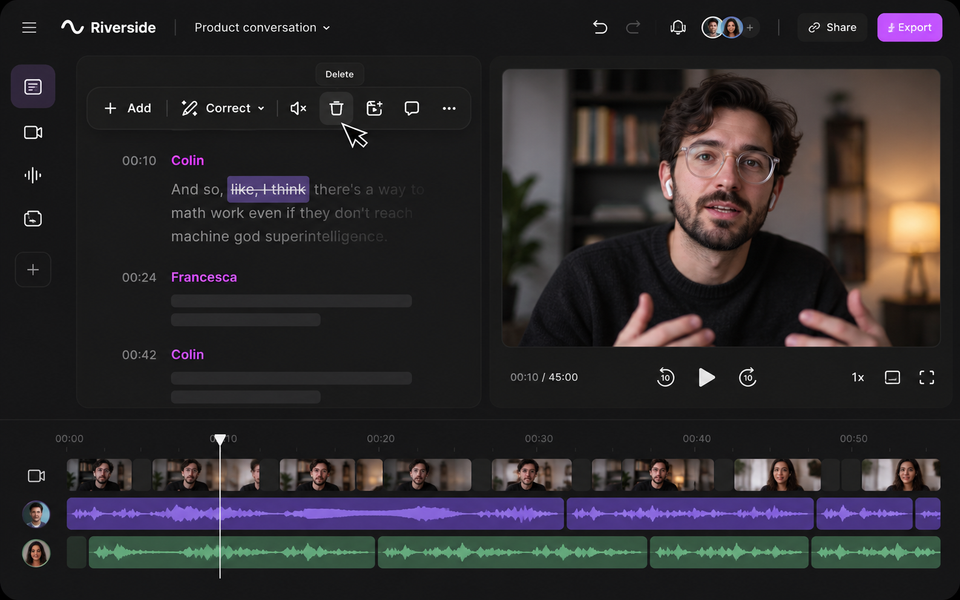
If one good conversation needs to become more than one finished recording, Riverside may be useful to explore. It combines remote audio and video recording with transcription, editing and repurposing tools, so an interview or podcast can become a full episode, shorter clips, captions, show notes and material for other content.
What it can help with
Riverside may help when you record interviews, podcasts or expert conversations remotely and want stronger source material for editing afterwards. Each participant can be recorded on a separate track, while transcripts and text-based editing make it possible to find and remove sections without working only from a traditional video timeline.
Inspiration Space note: Riverside is particularly useful when the conversation is the raw material, not simply a meeting to be documented. It creates a practical bridge between an expert conversation and the wider body of material that can follow: a full episode, an edited interview, short clips, a transcript, an article or a set of useful ideas to return to later.
Who it may suit
It may suit podcasters, consultants, founders and small teams producing interview-led or conversation-led content with people in different locations. It could also fit customer stories, training conversations or webinars where separate recordings and later repurposing matter.
How it works
Guests can join through a supported computer browser or Riverside's mobile app. Riverside records each participant locally on their device while uploading the files, which reduces dependence on the live call quality. Hosts should still prepare guests, test microphones and cameras, and make sure uploads complete after recording.
On Pro, Riverside currently supports up to 4K video and 48 kHz audio, alongside unlimited transcription, text-based editing, Magic Clips and AI-generated show notes. Riverside advertises transcription in more than 100 languages. Live-streaming and structured webinar functions sit on higher plans.
Cost and access
Price checked 2 September 2026. The Free plan is $0 and includes two hours of multi-track recording, up to 720p video, 44.1 kHz audio, editing tools and a Riverside watermark. Pro is $29 monthly, or $24 a month when billed annually. Grow and Webinar add further live, publishing and webinar features. Check the current comparison before subscribing.
What to check before committing
Before recording something important, check your plan's separate-track allowance, resolution, transcription, export and branding limits. Prepare guests in advance and have a backup approach for recordings you cannot easily repeat.
Review Riverside's privacy terms before recording confidential or sensitive conversations. Its current policy says recording content and transcripts may, in some circumstances, be used to improve or train Riverside's AI and machine-learning systems.
You are also responsible for giving participants appropriate notice and obtaining consent where required. Review the final transcript, clips and edit before publication, and check whether you still need separate podcast hosting, distribution or specialist post-production.
Next action
Compare the current recording, editing and export allowances against the kind of conversations you intend to produce before choosing a plan.
View Riverside plans